 English



FastStone Photo Resizer 4 – Batch Image Converter and Renamer for Windows
Release Information
-
Developer: FastStone Soft
-
Platform: Windows XP → Windows 11 (32/64‑bit)
-
File Size: ~3.2 MB
Product Overview
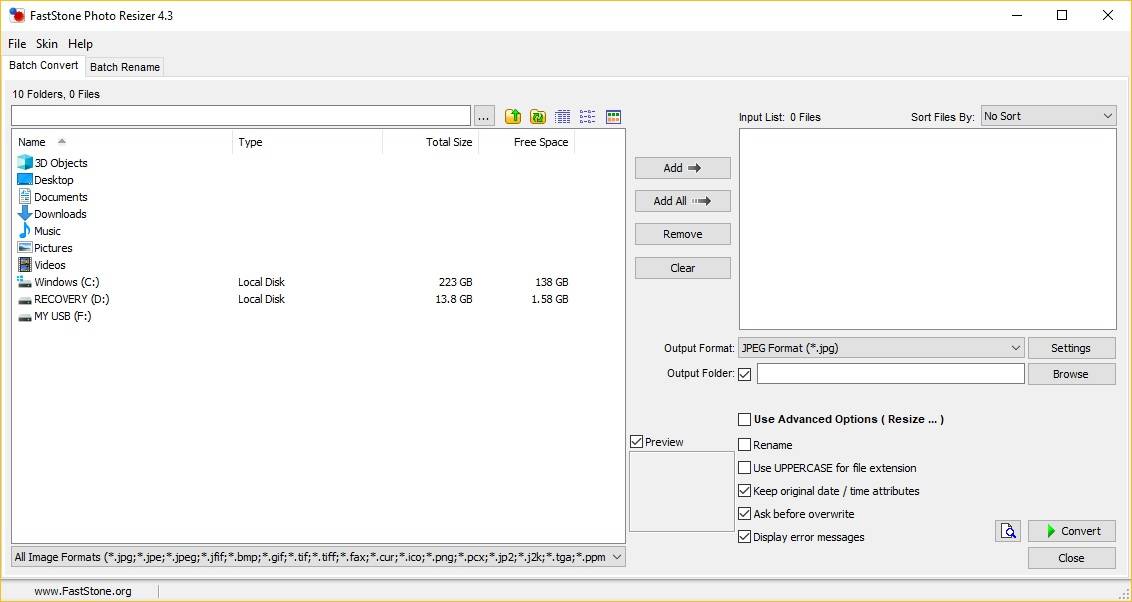
FastStone Photo Resizer 4 is a powerful batch image converter and renamer for Windows. It allows users to quickly convert, rename, resize, crop, rotate, change color depth, add text, and watermarks to large collections of images in one go. Designed for speed and simplicity, it’s ideal for photographers, designers, and businesses managing large image libraries.
Key Features
-
Batch Conversion & Renaming
-
Convert images into multiple formats (JPEG, BMP, GIF, PNG, TIFF, JPEG2000).
-
Rename files with flexible rules and templates.
-
-
Editing Tools
-
Resize, crop, rotate, and color adjust images.
-
Add text, watermarks, and borders.
-
Apply effects such as sharpening and blurring.
-
-
Advanced Options
-
Support for folder structures and subfolders.
-
Preview images before processing.
-
Save and load conversion settings for repeated use.
-
-
Format Support
-
BMP, JPEG, JPEG 2000, GIF, PNG, TIFF, and more.
-
How to Activate FastStone Photo Resizer 4
-
Download the Software
-
Save the setup file to your computer.
-
Install the Software
-
Double‑click the downloaded installer.
-
Follow the on‑screen instructions to complete installation.
-
-
Activate Your License
-
Launch FastStone Photo Resizer 4 after installation.
-
Enter the license information provided in your purchase order.
-
Once activated, the software will unlock all full features.
-
No reviews found!











No comments found for this product. Be the first to comment!